DELR - Delivery Routes
Overview
Setups
Add Invoices to Routes
Print Open Routes (Close Manifests)
Search and Display Routes
Reports
OPA Shiptrack
OPA Shiptrack
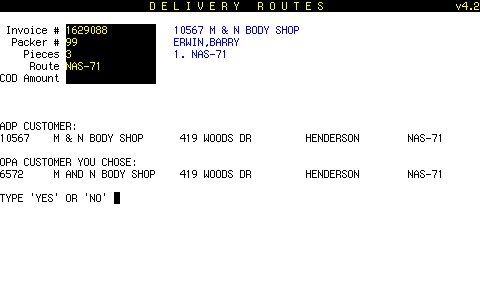 If the name doesn't match exactly, this screen will come up, prompting the user to enter YES or NO.
If the user chooses YES, the name pairs (ADP/OPA) are stored in a review file.
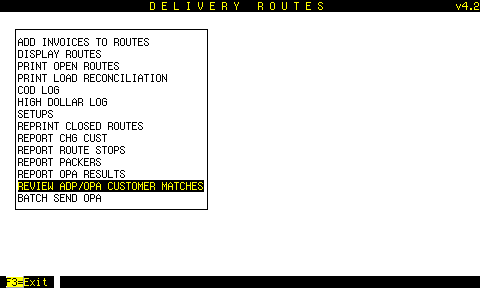
Reviewing Mismatches
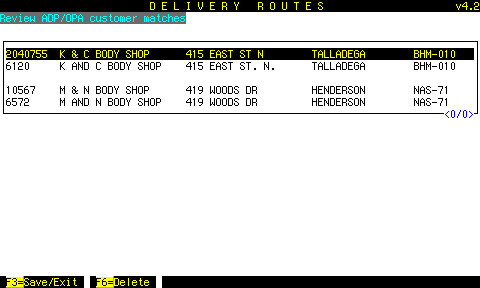 Use this screen to review for making changes either to ADP NAME-FILE or to the OPA Shiptrack database.
Highlight one of the lines of a pair, and press F6 to clean it out of the review.
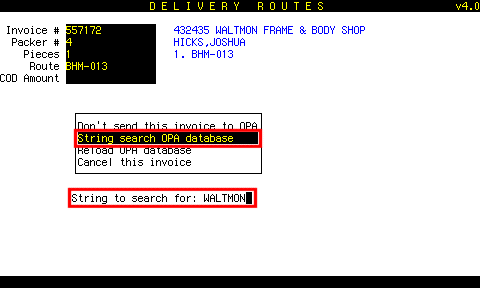 If no close matches are found, you can try a string search.
DELB will attempt to match the string anywhere in the database, including address, city, phone #, etc.
OPA Shiptrack Sale Types
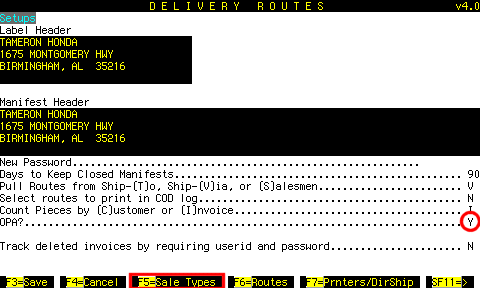 Shipments sent to OPA Shiptrack must be one of 3 sale types:
To associate your sale types with these OPA sale types, first make sure OPA? is Y.
Then press F5.
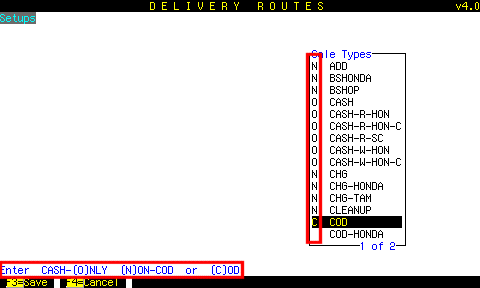 Enter
Enter O
N
or C
next to each of your sale types.
then F3 to save
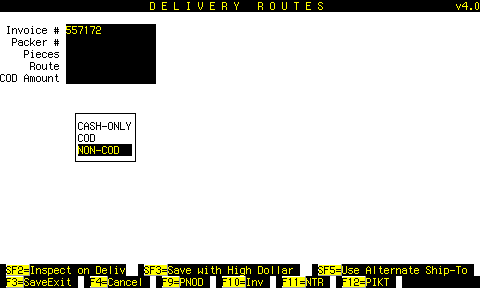 If you enter a shipment for which the sale type is not associated to one of the 3 OPA Shiptrack sale types, you will be prompted to choose one.
